
Seeders and Factories for Dummy Data
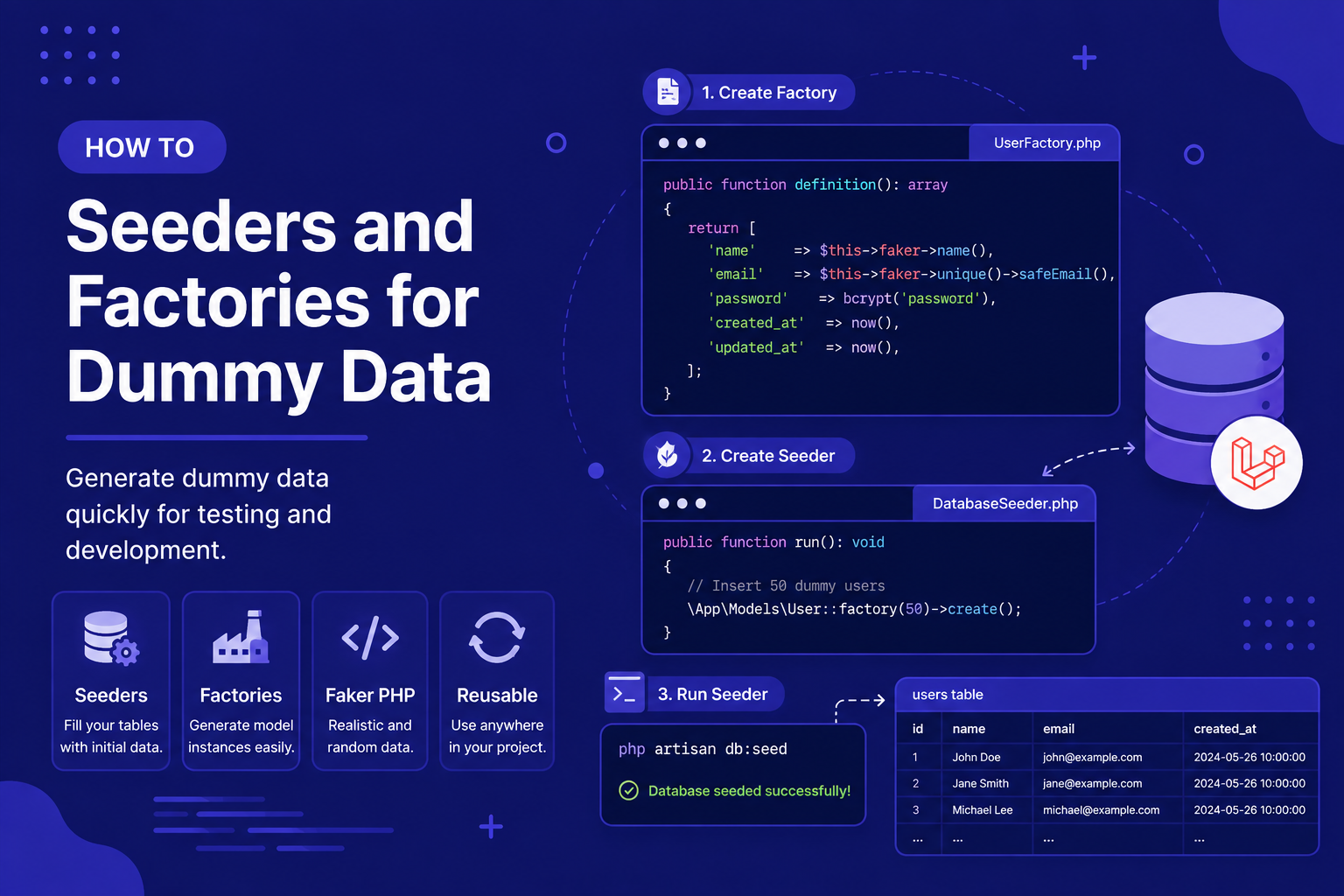
In this article, we'll walk through creating factories, defining realistic fake data, and writing seeders to populate your database efficiently.
303 views
Introduction
An empty database makes it hard to actually develop and test your application. Every time you build a new feature — a post listing page, a search function, a pagination component — you need real-looking data to see if it actually works. Manually inserting rows one by one through a database GUI is slow, repetitive, and doesn't scale when you need dozens or hundreds of realistic records.
Laravel solves this with two closely related tools: factories, which define how to generate fake but realistic data for a given model, and seeders, which use those factories (or manually defined data) to actually populate your database. Together, they let you go from an empty database to a fully populated one with realistic sample data, using a single command.
In this article, we'll walk through creating factories, defining realistic fake data, and writing seeders to populate your database efficiently.
What is a Factory?
A factory defines a blueprint for generating fake instances of a model — for example, fake posts with realistic titles, bodies, and timestamps, without you needing to write that data by hand.
Creating a Factory
php
php artisan make:factory PostFactoryIf a corresponding model already exists, Laravel automatically links the factory to it. This creates a file at database/factories/PostFactory.php:
php
<?php

namespace Database\Factories;

use Illuminate\Database\Eloquent\Factories\Factory;

class PostFactory extends Factory
{
    public function definition(): array
    {
        return [
            'title' => fake()->sentence(),
            'body' => fake()->paragraphs(3, true),
            'published_at' => fake()->dateTimeBetween('-1 year', 'now'),
        ];
    }
}
Understanding the fake() Helper
Laravel factories rely on the Faker library (accessed through the fake() helper) to generate realistic-looking random data. Some commonly used methods include:
php
fake()->name();            // "John Smith"
fake()->email();           // "[email protected]"
fake()->sentence();        // "Lorem ipsum dolor sit amet."
fake()->paragraph();       // A full paragraph of placeholder text
fake()->word();            // "consequatur"
fake()->boolean();         // true or false
fake()->numberBetween(1, 100);
fake()->dateTimeBetween('-1 year', 'now');
Using a Factory Directly
Factories can be used on their own, without a seeder, which is especially useful during manual testing via Tinker:
php
php artisan tinkerphp
\App\Models\Post::factory()->create();          // Creates one fake post in the database
\App\Models\Post::factory()->count(10)->create(); // Creates ten fake posts
\App\Models\Post::factory()->make();             // Builds a fake post WITHOUT saving it to the database
What is a Seeder?
While factories define how to generate fake data, seeders define what data should actually be inserted, and in what quantity, tying everything together into a repeatable process.
Creating a Seeder
php
php artisan make:seeder PostSeederThis generates a file at database/seeders/PostSeeder.php:
php
<?php

namespace Database\Seeders;

use App\Models\Post;
use Illuminate\Database\Seeder;

class PostSeeder extends Seeder
{
    public function run(): void
    {
        Post::factory()->count(20)->create();
    }
}
Registering Seeders
To have a seeder run as part of the main seeding process, register it inside database/seeders/DatabaseSeeder.php:
php
<?php

namespace Database\Seeders;

use Illuminate\Database\Seeder;

class DatabaseSeeder extends Seeder
{
    public function run(): void
    {
        $this->call([
            PostSeeder::class,
        ]);
    }
}
Running Seeders
php
php artisan db:seedThis runs DatabaseSeeder, which in turn calls every seeder registered inside its run() method.
To run a single seeder directly, without going through DatabaseSeeder:
php
php artisan db:seed --class=PostSeederCombining Migrations and Seeding
A very common workflow during development is resetting your database and immediately populating it with fresh sample data, in a single command:
php
php artisan migrate:fresh --seedSeeding Related Data
Real applications usually involve related models — for example, posts that belong to specific users. Factories handle this cleanly using relationships:
php
class PostFactory extends Factory
{
    public function definition(): array
    {
        return [
            'user_id' => \App\Models\User::factory(),
            'title' => fake()->sentence(),
            'body' => fake()->paragraphs(3, true),
        ];
    }
}
This tells Laravel that whenever a Post is created via the factory without an explicit user_id, it should automatically create (or use) a related User as well.
You can also explicitly attach a specific user:
php
Post::factory()->count(5)->create(['user_id' => $user->id]);Tips for Working with Seeders and Factories
Use realistic Faker methods that match your actual data — for example,
fake()->sentence()for a title, notfake()->word(), to better simulate real content while testing.Always register new seeders inside
DatabaseSeeder, or they won't run automatically withphp artisan db:seed.Use
migrate:fresh --seedas your go-to command during local development whenever you want a clean slate with realistic sample data.Define relationships directly inside factories (like linking posts to users) instead of manually creating related records every time you seed data.
Never run seeders that generate large volumes of fake data in production — seeders are meant for development and testing environments, not live data.
FAQ About Seeders and Factories
1. What's the difference between a factory and a seeder? A factory defines how to generate a single fake instance of a model (its "shape" and realistic values), while a seeder defines the actual process of inserting data into the database, often using one or more factories along with specific quantities.
2. Can I use factories in automated tests, not just for local development? Yes, factories are extremely common in Laravel's testing suite, letting you quickly generate realistic test data without manually creating records for every test case.
3. Is it safe to run php artisan db:seed multiple times? It depends on your seeder's logic. If it always creates new records (like Post::factory()->count(20)->create()), running it multiple times will keep adding more data rather than replacing what's there. Design seeders carefully if you need idempotent behavior.
4. Can I create specific, named test data instead of purely random fake data? Yes. You can override any field in a factory when generating a record: User::factory()->create(['email' => '[email protected]']), giving you a mix of realistic random data and specific known values.
5. What happens if I seed data that references a table that doesn't exist yet? You'll get a database error. Make sure you've run your migrations first (php artisan migrate) before attempting to seed related data.
6. Do I need Faker installed separately to use the fake() helper? No, Faker is included with Laravel's default installation and is ready to use immediately through the fake() helper, without any additional setup.
Conclusion
Seeders and factories together solve one of the most tedious parts of application development: getting realistic sample data into your database quickly and repeatably. Once set up, a single php artisan migrate:fresh --seed command can take you from an empty database to a fully populated one, ready for development or testing.
In the next article, we'll shift focus to Eloquent, Laravel's powerful ORM, and start exploring how to actually query, create, and manipulate the data now sitting in your database.
Found this helpful? Share it!